| |

The workbook
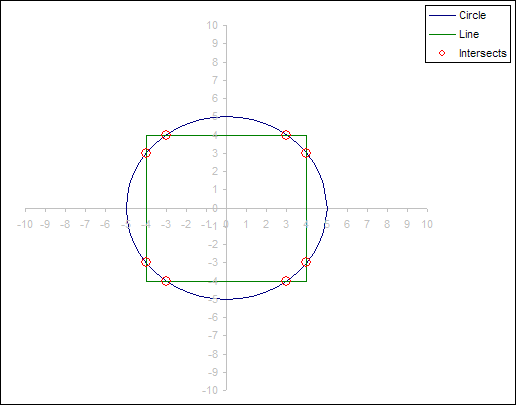
contains code for 2 User Defined Functions array functions which
output the intersection points between a Circle and either
another Circle or a line.
|
| |
IntersectLineCircle:
=IntersectLineCircle(
LineCoordinates , CircleX , CircleY , Radius )
LineCoordinates is a 2
column range which contains the x and y points for a line.
CircleX is the X position of
the circles center point. Can be a value or range reference.
CircleY is the Y position of
the circles center point. Can be a value or range reference.
Radius is the radius of the
circle. Can be a value or range reference.
The function returns an array
of X and Y intersect points. As the number of possible intersect
points between a line and circle has a maximum of 2 points the
size of the array formula can be determined from the input
information. The number of possible intersections is (Line
segments-1)*2 |
|
|
IntersectCircleCircle:
=IntersectCircleCircle( Circle1X
, Circle1Y , Radius1 , Circle2X , Circle2Y , Radius2 )
Circle1X and Circle2X are
the X position of the circles center point. Can be a value
or range reference.
Circle1Y and Circle2Y are the
Y position of the circles center point. Can be a value or
range reference.
Radius1 and Radius2 are the radius of the circle. Can be a
value or range reference.
The function returns an array
of 2 X and Y intersect points. |
|
|
Remember when using array formula to commit the formula
with CTRL + SHIFT + ENTER
|
|
|
The
download contains both
example charts and associated data sets and required vba code.
|
|
|
|
| |
 Tested in xl2007
|
|
| |
|

 AJP Excel Information